Homey Pro: Alert Last Person if Windows/Doors Are Open
2026-05-31
This HomeyScript sends a notification to the last person who left the house if they forgot to close any windows or doors.
Idea
Send a critical alert to the last person who left the house if a window or door is still open. The push message specifies the rooms (zones) where the window or door is still open.
Problem
My Homey Pro has a flow card to start a flow when the last person leaves. This card even generates a name tag of the person who just left. However, in the mobile push notification card, I cannot use this tag to select the recipient of the message.
I want to send the alert to the person who left last, so that anyone who left earlier isn’t disturbed about an open window or door. After all, they can’t do anything about it anyway!
Solution
I wanted to query the user object from the database to check the user’s leave time, but this field isn’t available in the Homey user database. I discovered I could query the notifications object and extract the presence messages to determine who left last.
Note that if you want to use my script, you have to enable presence on the timeline in the Homey settings.
Helper function
In my script, I use a list of excluded contact sensor IDs (such as interior doors), that should be skipped during the open window/door check.
I have created a helper function to retrieve the IDs of all contact sensors linked to my Homey Pro. By copying these IDs into a static exclusion list once, the script doesn’t need to query and filter every single device on each run.
This minimizes overhead on the Homey Pro. After all, it’s custom built for my home anyway.
You can run the helper function below in a new HomeyScript to output all your contact sensors along with their name, zone, and ID:
const devices = Object.values(await Homey.devices.getDevices());
const zones = Object.values(await Homey.zones.getZones());

console.log('--- LIST WITH ALL CONTACT SENSOR NAMES AND IDS ---');

for (const device of devices) {
    if (device.capabilities && device.capabilities.includes('alarm_contact')) {
        const zone = zones.find(z => z.id === device.zone);
        const zoneName = zone ? zone.name : 'Onbekende zone';
        console.log(`  '${device.name} (${zoneName})': '${device.id}',`);
    }
}
The main script
My main script works as follows:
- I created an Advanced Flow triggered by the presence block:
The last person left home. - This block triggers the HomeyScript block:
door-window-check.
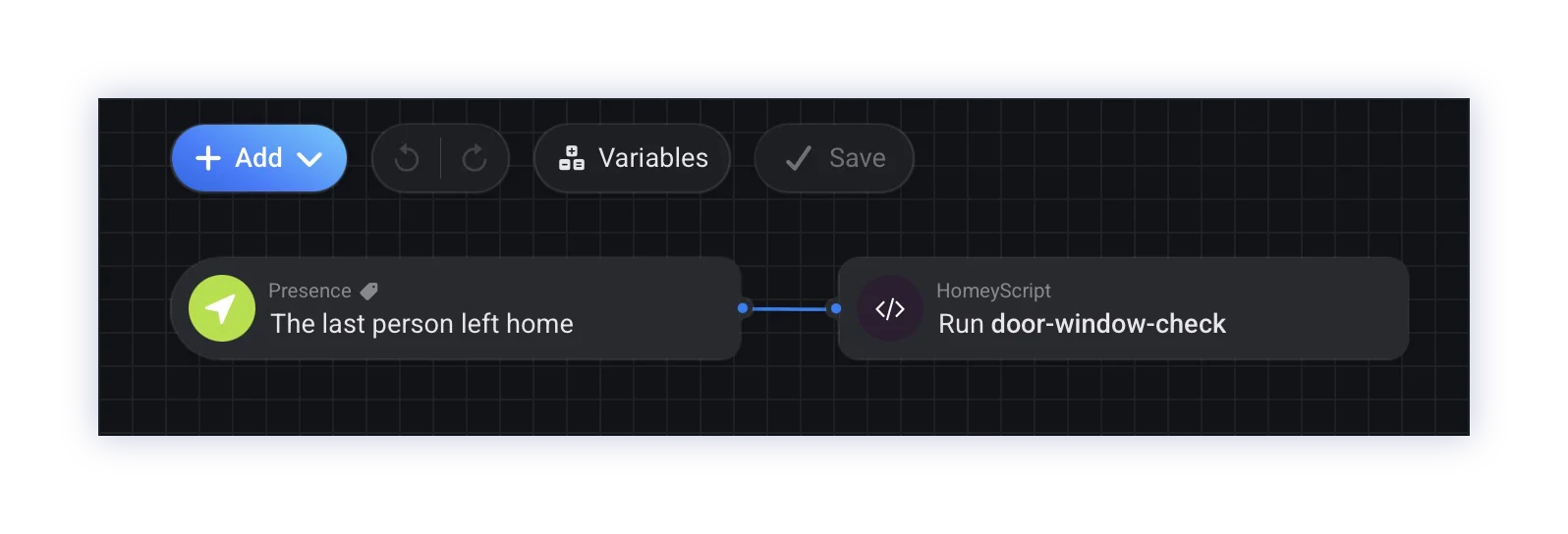
To set this up, create a new HomeyScript called door-window-check.js and paste the following content:
const users = Object.values(await Homey.users.getUsers());
const devices = Object.values(await Homey.devices.getDevices());
const zones = Object.values(await Homey.zones.getZones());
const notifications = Object.values(await Homey.notifications.getNotifications({ limit: 20 }));

const EXCLUSION_LIST = [
    'a1b2c3d4-e5f6-4a1b-8c9d-0123456789ab', //-> Interior door sensor (scullery)
    '123e4567-e89b-12d3-a456-426614174000'  //-> Interior door sensor (garage)
];

// This function is intended to generate a Homey notification
// for debugging purposes.
async function createNotification(message) {
    await Homey.flow.runFlowCardAction({
        uri: "homey:flowcardaction:homey:manager:notifications:create_notification",
        id: "homey:manager:notifications:create_notification",
        args: { text: message },
    });
}

async function sendCriticalPush(userData, pushMessage) {
    await Homey.flow.runFlowCardAction(
        {
            uri: 'homey:manager:mobile',
            id: 'homey:manager:mobile:push_text_critical',
            args: {
                user: {
                    athomId: userData.athomId,
                    id: userData.id
                },
                text: pushMessage
            },
        }
    )
        .then(() => log('runFlowCardAction OK'))
        .catch(error => log(`runFlowCardAction Error:`, error));
    return lastDepartedUser;
}

async function whoLeftLast() {
    for (const notif of [...notifications].reverse()) {
        if (notif.ownerUri === 'homey:manager:presence') {
            const text = notif.excerpt ? notif.excerpt.toLowerCase() : "";
            if (text.includes("weggegaan") || text.includes("left")) {
                for (const user of users) {
                    if (user && user.id === notif.meta.userId) {
                        return {
                            name: user.name,
                            id: user.id,
                            athomId: user.athomId
                        };
                    }
                }
            }
        }
    }
    return null;
}

// I don't want to use the "if zone is active" flowcart,
// because it also includes motion sensors.
let openZones = [];

for (const device of devices) {
    if (device.class == "sensor" && device.capabilities.includes('alarm_contact')) {
        if (EXCLUSION_LIST.includes(device.id)) {
            continue;
        }
        if (device.capabilitiesObj?.alarm_contact?.value === true) {
            const zone = zones.find(z => z.id === device.zone);
            if (zone && zone.name) {
                if (!openZones.includes(zone.name)) {
                    openZones.push(zone.name);
                }
            }
        }
    }
}

let pushMessage = "";
if (openZones.length > 0) {
    let zoneText = "";

    if (openZones.length === 1) {
        zoneText = `in ${openZones[0]}`;
    } else {
        const latestZone = openZones.pop();
        zoneText = `in ${openZones.join(', ')} en ${latestZone}`;
    }

    pushMessage = `⚠️ Please note: a door or window is still open ${zoneText}!`;

    userWhoLeftLast = await whoLeftLast()

    sendCriticalPush(userWhoLeftLast, pushMessage)

    // Below lines are for debugging purposes,
    // comment the code if you want run in production.
    // ----------------------------------------------------------------------
    createNotification(`Message sent to **${userWhoLeftLast.name}** with notification that a window or door is still open in ${zoneText}`)
    console.log(userWhoLeftLast)
    console.log(pushMessage);
}